
Guide
What's on the ticker, and what each setting changes. Every box on the Settings page has a ? in its corner that opens its section here, and each section here links back to that box.
Reading the ticker
Each kind of thing you follow - sports, stocks, news, flights - gets a row of its own, scrolling at its own pace. The pictures on this page are the ticker drawing its demo card, with Logos off. With it on, which is how a new account starts, a crest or logo sits beside each team, company and headline.
Games

| On the row | What it means |
|---|---|
| The two teams | The visitors on top, the home team underneath, each beside a bar of its colour - or its crest, with Logos on. |
| The scores | The team in front has its score lit up. |
| R H E | Baseball's runs, hits and errors. |
| A red dot | The game is live. Beside it, the inning (Bot 7th is the bottom of the seventh) or the clock and the period. |
| The diamond, the dots and 3-2 | Runners on base (a filled base has one), outs (filled dots), and the count: balls, then strikes. |
| AB and P | Who is at bat and how their game has gone, and who is pitching, with their line so far. |

Football adds an arrow beside the team with the ball, three short bars for the timeouts each team has left, the down and the distance and where the ball is, and the last play in words. The down and distance turn red when a team is inside its opponent's 20, the red zone. Hockey and basketball show the score, the clock and the period.
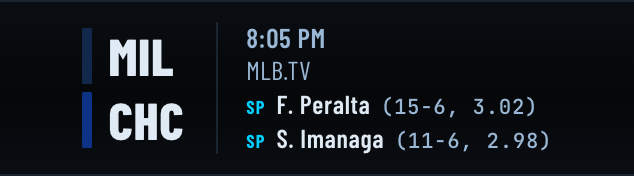
A game still to come shows its start time, the channel showing it, and in baseball each side's probable starting pitcher (SP) with their record and ERA. How far ahead the ticker reaches is set under What to show.
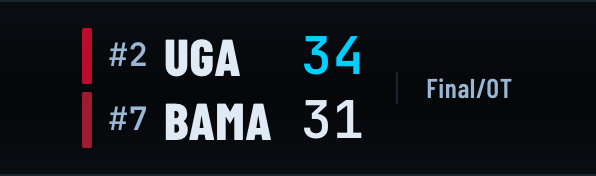
A finished game says Final, with /OT when it went to overtime. In college sports, #2 is a team's place in the national rankings.
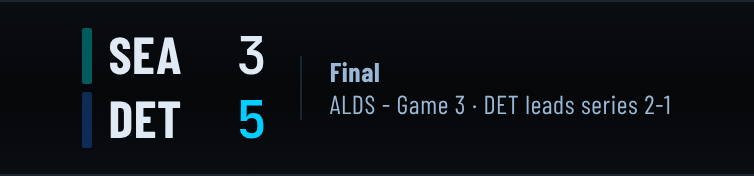
In the playoffs a game names its round under the clock - ALDS - Game 3, AFC Wild Card Playoffs, a bowl - and, in a series, how it stands. The game that settles a series says who won it: LAD win series 4-3. On an LED panel the same line is shortened to fit: ALDS G3 DET 2-1.
Big moments
A few things get a badge of their own, drawn beside the game while they are true.

RAIN DELAY (or a suspension or postponement) keeps the inning the game stopped in beside it, so you can see where it will pick up.

NO-HITTER BID appears from the fifth inning when a team has no hits yet, naming the pitcher, and PERFECT GAME BID when nobody has reached base at all. It goes the moment a hit lands.


When a team scores, the play gets a moment of its own for two minutes, with the scorer's name: runs, home runs and grand slams in baseball; touchdowns, field goals, safeties and two-point conversions in football, where a sack, an interception or a fumble the defence recovers gets one too; goals in hockey. Basketball has none: it scores too often for a celebration to mean anything. Turn them off per screen with Score celebrations under How each device draws it.
Standings



| On the row | What it means |
|---|---|
| The numbered box | Each team's place. Green means it has won what the table is for: its division, on a division table, or a place, on a wild-card table - so each division has one green and each baseball wild-card table three. Yellow, on a division table, is a team that has clinched a wild card instead: it is in the postseason, and the division is somebody else's. Red means it can no longer reach the postseason at all, and grey that it is still playing - which is every team for most of a season. College football has no playoff a table can clinch, so there green means six wins, enough to be picked for a bowl game, and red means six wins are out of reach. |
| The thin coloured bar | The team's colour. |
| 81-62 | Wins and losses (and ties, in football). |
| ▲4 and ▼2 | The current streak: won the last four, or lost the last two. |
| .566 | Winning percentage, in baseball. |
| GB, GA and - | In a division, games behind the leader, who has the dash. A wild-card table is measured from the last team in, which has the dash: the teams above it are games ahead (GA) and the teams below it games behind (GB). |
| MAGIC 5 | Baseball's magic number, in the last weeks of a season: any mix of the team's own wins and its closest rival's losses that adds up to it clinches the place. A division leader's counts down to the division; on the wild-card table each team holding a place counts down against the closest team outside them. It stands where the games behind would be, and goes when the place is won. |
| (2-0) | A college team's record inside its own conference, beside its overall one. A conference table is ordered by it, which is why a 5-1 team can sit above a 6-1 one. |
Pick the leagues whose tables you want under Standings.
The postseason bracket

Each league's postseason comes as a bracket, drawn as one. Baseball's is double-sided: the American League from the left and the National League from the right, each round under its league and its name - AL WC, AL DS, AL CS on one side, NL CS, NL DS, NL WC on the other - and the World Series (WS) in the middle, with a box above it that holds the champion once there is one. A division winner that sits out the Wild Card Series waits in its Division Series place, so the line from each Wild Card series runs into the place its winner takes: --- v TB until it is decided.
Each series is a line - NYY 2-1 BOS, each team with its colour bar - and each later round sits between the series that feed it, joined to them by a line, so the winners can be followed across to the final. A team that goes out is dimmed, bar and name, so the colours still lit are the teams still in it. The score is red while a game is being played, and a series not started yet reads NYY v BOS. A place still being played for reads --- until it is decided.
The other leagues' come a bracket for each conference, and one for the final once a team is in it, the first round down the left. Football's top seed stands alone in the first round, its bye, and football plays every round as a single game, so each line shows the game's score where a series shows its wins; its divisional round is drawn from who is left - the top seed plays the lowest seed still in it - with no line into it until that is settled. The NHL pairs teams by division, and the WNBA's is one bracket for the whole league, its Finals the last column. The bracket comes with a league's tables, so it is on wherever they are.
It appears as soon as the first team in a league clinches a place, beside that league's tables, drawn from the standings as they are: a team whose place isn't won yet is dimmed until it is. When the first postseason game starts, the bracket takes the tables' place, and once there's a champion the tables come back with the final bracket beside them, through the offseason, until the new season's standings begin. The NBA's tables stay through its play-in, which decides its seventh and eighth seeds - until it has, those two places show whoever holds them, dimmed.
Races and tournaments


A race or a golf tournament is one running order rather than two sides. The row names the event and where it has got to (LAP 154/267, round R3, QUAL Q3 for the last part of qualifying), then the field in order. T1 is tied for first. In golf, each player's score to par for the tournament, then for today (E is even par), then F for a finished round, or THRU and the holes played so far. LEAD CHANGE says who just took the lead from whom. How much of the field to show is under Race and tournament fields.
A car is drawn by its number, in the car's own colours. In a NASCAR race, after the name comes the gap to the leader in seconds (+0.565), or how many laps down it is (−1 LAP). PIT means it is on pit road, OUT that it is out of the race, and FREE PASS marks the car that got a lap back under caution. While the flag is anything but green the row says so (CAUTION). The gaps and the flag come from NASCAR's own timing, so Formula 1 and IndyCar show the running order without them.
Race mode
Race mode turns the ticker into the race while one you follow is live. On a screen with one row, the race takes it over. With stacked rows it takes the row the race is in, and the others keep scrolling. On the left is the track with every car on it, spaced by the real gaps and in the flag's colour. Beside it are the lap, the laps to go and, in NASCAR, the stage. The whole running order scrolls past. On a wide, short strip the leaders stay pinned beside the map as well. Under caution the track turns yellow, the field closes up behind the pace car, and the reason it came out is shown. See it running on a sample race.
Where each car sits comes from NASCAR's timing, a few seconds behind the race itself. The order, the gaps and who is lapping whom are real; where the start line is drawn on the map is not, so the whole field can be turned a little round the track from where the television has it. It is off until you turn it on, separately for this browser and for an LED panel, because it takes the screen over for a race's three hours.
Stocks

The symbol, the price, and the change since yesterday's close, green up and red down. The line is today's trading so far; the dotted line across it is yesterday's close, so you can see at a glance whether it is above or below it. When a stock has moved sharply and there is a story about it from the last few hours, the story rides beside the price under BREAKING. Build your list under Favorites.
News

Each headline, led by the outlet's masthead and, when the story is about one, a team's crest or a country's flag (with Logos on). NEW marks a story the first time it comes round.
Flights

| On the row | What it means |
|---|---|
| BAW296 and G-ZBKF | The flight's callsign and the aircraft's registration. |
| 37,000 ft, 488 kt | Its altitude, with an arrow while it climbs or descends, and its speed in knots. |
| 18 nm ENE | How far away it is in nautical miles, and which way to look. |
| The type | What the aircraft is, with WIDEBODY for the big twin-aisle jets. |
| The scope | Where it is around you, with north at the top. |
| The line underneath | How far along its route it is, when the route is known. |


Near an airport, a flight says what it is doing, and where: DEPARTED or LANDED when that is certain, CLIMBING OUT or ON APPROACH when it is likely. Military aircraft are marked MIL. A plane you track under Favorites appears wherever it is, not only overhead.
Settings: General
What appears where, how each screen draws it, and when.
Upgrade window
Shown once you have an LED panel. The hours when your panels may install a software update. Installing restarts a panel: it shows UPDATING with a bar counting down for ten seconds, goes dark for a moment, and comes back. So pick hours when nobody is watching; a new account's window is 2am to 4am. A panel whose schedule has it off, or that is dark in living room mode, updates silently. Times are each panel's own local time, and the same hour at both ends means any time at all.
Open Upgrade window in Settings
Where each ticker appears
A grid of your tickers - Sports, Stocks, News, Flights - against the screens you have: the browser, and your LED panels once you have one. Tick a box to show that ticker on that screen, so stocks can be on the desk and sports on the wall. A box that is partly filled means only some of that ticker's feeds are on there; choose which on the ticker's own page, under Feeds.
Open Where each ticker appears in Settings
How each device draws it
Each screen is set up on its own. A screen you never touch here follows the browser.
Browser. The Theme is the ticker's look, and the Layout is how a game is arranged:

GridTicker terminal, TV score box - how a new account starts.

ESPN Bottom Line.

Retro LED.

Single line: the whole game along one line, like the original broadcast crawl.
- Stack tickers in rows gives each ticker a row of its own. Off, they share one strip, one after another. How tall each row is, is set per ticker under Appearance.
- Fit text to the screen sizes the text to the window's height, so a thin strip across a monitor and a whole television both get what fits. Off, Text size sets it.
- Pause on hover stops the strip while the mouse is over it, so you can read a score without chasing it.
- Score celebrations turns the big moments on or off.
- A speed for each ticker, in pixels a second: headlines slower than scores, prices faster.
LED panel, once you have one. On real pixels the theme is the colour: both Full team colors options draw each team in its own colours, and Amber monochrome draws the whole strip in one colour, like a stadium board. The layouts are TV score box, Single line and Large logos, which gives the panel's whole height to a team crest either side of a big score - the only size at which a crest is readable, at the cost of a longer trip round. Then Score celebrations, Brightness, and one Scroll speed for the whole strip, since a panel is a single row. A panel picks changes up on its next refresh.
Open How each device draws it in Settings · Browser · LED panel
Time zone
The time zone your schedules are worked out in. It is set here rather than read from your browser because the schedules run on our side, so an LED panel obeys the same hours even in another house. A panel can also have a time zone of its own, under LED panels.
When each ticker appears
Hours for each ticker on each screen - stocks while the market is open, scores in the evening. Add a window, set its start and end, and pick its days; a window that ends before it starts runs past midnight. A ticker with no windows shows at all times. To hide one completely, turn it off under Where each ticker appears instead. Removing the last window asks which you meant: off, or at all times.
Open When each ticker appears in Settings
Settings: Sports, Stocks, News and Flights
Each ticker has a page of its own, with the boxes that apply to it.
Feeds
The feeds that make up the ticker - each league, the stock lists, each news outlet, the kinds of flights - and which screen each one appears on. Sports is grouped by sport. College football shows the top division (FBS) unless you tick more under Divisions, and Conferences narrows the top division to the ones you pick.
Open Feeds in Settings: Sports · Stocks · News · Flights
Standings
Tick a league to add its tables to the strip - the tables its playoffs are decided by (see reading standings). Baseball, football and hockey get a row per division and a wild-card table for each league or conference. Basketball's pro tables are the NBA's two conferences, down to the play-in, and the WNBA as one league. College tables are conferences, ordered by conference record, and the top of the AP poll rides in front of them - from November in college football, the playoff committee's ranking instead. They ride along with the league's games, so the league has to be on under Feeds for its table to appear. Baseball's tables carry the winning percentage and games behind; the rest are by record, as their own scoreboards are. None are on until you pick some.
Race and tournament fields
How much of a race or golf field to show, for each screen: the Top 9, or the whole field (Full grid, Full leaderboard). A full F1 grid is 22 cars and a NASCAR field 38, but a golf field can be 156 players - nearly two minutes of scrolling on an LED panel. Golf players chooses between Player cards, with each player's photo, and Plain rows.
Open Race and tournament fields in Settings
Favorites
The things you care about most, one tab per feed. What a favourite does is set under What to show: ahead of the rest, or on its own.
- Sports: star your teams. Type in the search box to find one in a long list.
- Stocks: My watchlist is a list you build. Type a symbol -
AAPL, an index like^GSPC, a future likeGC=F, orBTC-USD- and press Add. Tick a symbol to star it; the × removes it. Up to 20. - Flights: Tracked flights follows particular aircraft by callsign
(
UAL1655), registration (N14242) or ICAO hex code. A tracked plane appears while it is flying and in range of a receiver, wherever it is. Up to 5.
Open Favorites in Settings: Sports · Stocks · Flights
Where you are
On the Flights page: the point the flights ticker watches the sky from. Type an airport code
(MDW or KMDW) or use your browser's location - your house is usually a
better answer than the airport, since it is what "8 nm NE" is measured from. How far
out sets the radius, from 5 to 250 nautical miles; 60 is about the horizon for an airliner
at cruising height.
Open Where you are in Settings
What to show
Switches for what each ticker includes. On the Sports page:
- Live, Upcoming, Final and Preseason: games in progress, games still to come, finished games, and preseason games. Upcoming reaches sets how far ahead: today only, to the next two weeks. Days count in your own time zone.
- Favorites only shows only your favourites - league by league. Star a few college teams and that league shows only those, while a league you have starred nothing in still shows everything.
- Favorites first puts your favourites ahead of the rest of their league.
- Logos: a crest beside each team, and logos on stocks and headlines.
- League dividers: a league's mark where the strip moves from one league into the next.
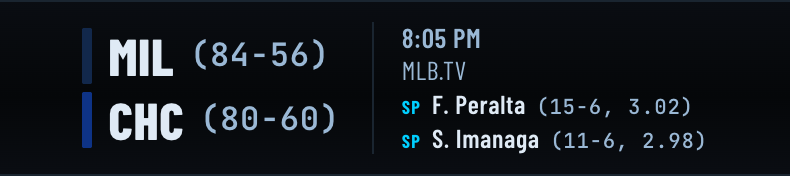
- Records: each team's win-loss record beside its name on a game still to come. Off at the start:
The Stocks and Flights pages have the two favourites switches. They are one setting shared by every ticker, so changing them on one page changes them on the others.
Open What to show in Settings: Sports · Stocks · Flights
Appearance
Row height is how much of the window this ticker's row takes, compared with the others, when tickers are stacked in rows: a ticker at 4 beside one at 2 is twice as tall. Flights start tallest, since a flight carries the most on it.
Open Appearance in Settings: Sports · Stocks · News · Flights
Settings: Living room
For an LED panel in a room other people share. It applies to your panels only: the browser carries on as normal, so you can still check a score while the wall is quiet.
Living room mode
One switch for when nobody wants a ticker. It overrides every feed, schedule and favourite on your panels - those all stay set, and come straight back when you turn it off.
Open Living room mode in Settings
What the panels do instead
Lights off turns the panel black while it keeps running, so the scores are back within a minute of switching the mode off. Artwork shows seasonal pictures instead of data. You can set this up before turning the mode on.
Open What the panels do instead in Settings
Which artwork
Pick scenes to show, or pick none and the panels follow the calendar - Halloween in October, Christmas in December, and the season in between. With more than one picked, Rotate moves between them; Brightness here is separate from the ticker's, because a picture in a dark room wants far less.
Open Which artwork in Settings
Weather scene
The one scene that needs setting up first: where you are, as a ZIP code, an airport code, or your browser's location. Forecasts come from the US National Weather Service, so it works inside the United States only. Choose °F or °C, and up to three lines to show beside the picture: the place name, today's high and low, wind, humidity, or the conditions in words.
Open Weather scene in Settings
Settings: LED panels
LED panels are in testing and not for sale yet; this is for people who already have one. Setting one up is in the FAQ.
Add a panel
A new panel shows a six-character code on its screen once it is on your Wi-Fi. Type it here and the panel joins your account.
LED panels
Every panel on your account, and they follow it: change your teams or schedules and they update on their own. For each one:
- its name, which you can change, and the software it is running;
- when it was last seen, and a warning if it has gone quiet;
- its own time zone, for a panel in another house - it keeps your teams and uses their hours;
- its wiring - how many panels, the adapter, the panel type and the board - which only changes if the hardware does;
- Restart ticker, Reinstall software for a panel that seems stuck on an old version, and Fetch logs so a problem can be read rather than guessed;
- Remove, after which the panel forgets your Wi-Fi and goes back to setup, ready for its next owner.
Brightness, speed, theme and layout are under How each device draws it.
Settings: Account
Subscription
Start your subscription, or manage it: cards, invoices and cancelling are all on Stripe's own page, reached from Manage billing. What it costs is in the FAQ.
Change password
Your current password, then the new one twice - at least 8 characters. Changing it signs out every other device and browser; the one you are using stays signed in.
Open Change password in Settings
Recovery email
An address a forgotten password can be reset through. We send a link to it, and it only counts once you follow that link - within 24 hours - so a typo cannot lock you out. Remove it here whenever you like.
Open Recovery email in Settings
Delete account
Erases your account for good, with your settings and anything you have connected; it cannot be undone. Your LED panels forget their Wi-Fi and go back to setup, and a subscription is cancelled straight away. Delete your account lists exactly what is removed.