The GridTicker LED panel is a bright display for your wall that scrolls the
things you follow, much like the ticker along the bottom of a sports broadcast. Your teams'
scores, your stocks, the local weather, the latest headlines, even the planes flying
overhead: you choose what it shows.
Every panel comes with a free trial of GridTicker.
Try it yourself
This is the panel's own software running a sample day, at a real panel's
size and speed. Pick a look, a layout and what it shows, and watch it change.
What you'll see on it
Live scores
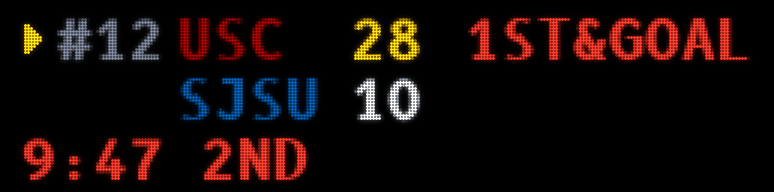
Pro and college games as they happen, with the details you'd see on TV: the count and
who's on base, down and distance, and the time left on the clock.
Standings and the playoff picture
League and conference standings alongside the games, and the playoff race as the
season heads toward its finish.
Race day
Race mode shows every car on a map of the track, spaced out by the real gaps between
them, along with the current flag and the laps to go.
Stocks
Your watchlist and how each stock is doing today, with an alert when one of them
crosses a level you've set.
Headlines
Stories from the news outlets you pick, with breaking news clearly marked.
The weather
Current conditions, the next few hours and the days ahead, plus weather watches and
warnings for the places you care about.
Planes overhead
The planes flying over your home right now, and where they're coming from and going,
when that's known.
Launches and the night sky
Upcoming rocket launches with a countdown, the International Space Station on its way
around the world, and a heads-up when it will pass over you.
Living room mode
Watching a movie or having friends over? One switch on your phone or computer turns the
panel off, or shows calm seasonal artwork instead, until you switch it back.
What the panel can show
depends on the outside sources GridTicker gets its information from, and it can change if they
do. The terms of sale explain what that means for
you.
Make it yours
More than a billion billionways to set up your panel, counting only which of GridTicker's more
than 60 feeds you switch on. Then every feed has options of its own.
Everything you follow
Your favorite teams, from the pros to hundreds of college programs, up to 20 stocks,
the news outlets you trust, up to four weather locations and the flights you want to
track. Whatever you've already set up in your browser is there from the start.
Options inside every feed
Stock alerts for a big move, a trading halt or a moving average crossed, with your own
numbers. As much or as little weather warning as you like. How far around you to watch
for planes, and how high a space station pass has to climb before it's worth going
outside.
A look for every room
Every team in its own colors, or the whole panel in amber like a stadium board. A
TV-style score box, a single line or large logos, at the brightness and scroll speed you
like.
Each panel, its own way
With more than one panel, each one, or each group of panels, can show something
different, with its own look, schedule, brightness and speed: scores in the den and
stocks in the office.
On your schedule
Give each kind of information its own hours on the days you choose, so stocks show
while the market is open and the panel goes dark at bedtime. Living room mode quiets it
all with one switch.
Alerts that can't wait
A tornado warning for one of your places takes over the whole panel, even in living
room mode or when its schedule has it dark. The space station passing over, a launch you
can see from home and an eclipse can each take over too, with a switch of their own.
Help whenever you want it
An AI assistant, built in. Once you're signed in, tap the ? in the corner
of any page and ask in your own words. It can see your settings, explains what to change,
and gives you a button that takes you straight there. Your conversations aren't saved.
A guide to every setting. Our guide explains everything on
the ticker and every setting, with pictures, and each box on the Settings page has a
? that opens its part of the guide.
A quick start to begin. A few short cards walk you through the basics the first
time you sign in, and they're there again whenever you'd like a refresher.
Every option
Here is what you can choose, feed by feed. Every picture is the panel's
own software drawing a sample day, LED by LED.
Sports
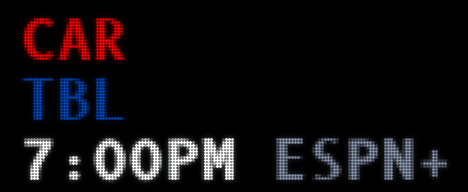
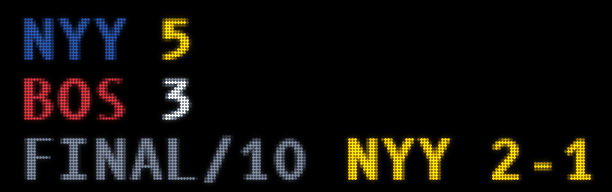
A grand slam, the moment it happensA touchdown, with the referee's signalCollege football, first and goalA game still to come, with its channelA final, and where the series stands
21 leagues and tours: MLB, the NFL, the NBA, the WNBA and the NHL; college football, men's and women's basketball, baseball and softball; Formula 1, IndyCar and NASCAR's Cup, Xfinity and Truck series; and the PGA Tour, LPGA, LIV Golf, DP World Tour, Korn Ferry Tour and PGA Tour Champions
Your favorite teams, put ahead of the rest or shown on their own
College football by division, from the top division down to Division III, and by conference
Live games, upcoming games, final scores and preseason games, with upcoming games from today out to two weeks
Standings for the leagues you pick, down to the wild card races, with the AP poll and the playoff ranking in college football
The playoff bracket, from the first team to clinch to the champion
Races and golf tournaments as the top nine or the whole field, with golfers as cards in their country's colors or as plain rows
Each team's record beside its name, celebrations for the big plays, and race mode, which puts every car on a map of the track
Stocks
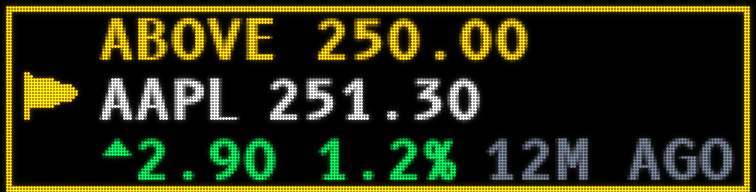
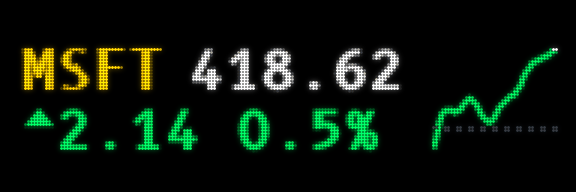
An alert: a price you set, crossedA stock and the shape of its dayBreaking news on a stock you follow
A watchlist of up to 20 symbols - stocks, market indexes, futures, crypto and currencies - plus ready-made lists of indexes, big tech, commodities, crypto and currencies
Each price with its move for the day and a line of how it got there
Alerts for a big move today, a sudden move, unusual volume, a new 52-week high or low, and a trading halt or resumption, each with your own numbers
Technical indicators, worked out from a year of prices: simple and exponential moving averages, Bollinger bands, RSI, MACD, VWAP, pivot points, yesterday's high and low, and Fibonacci retracements
Price levels of your own, up to six for each symbol, with a label like Buy, Sell or Stop
Breaking news on the companies you follow, beside their prices
News
A headline that just came in
Headlines from ABC News, Al Jazeera, Breitbart, CBS News, Fox News, NBC News, Newsmax, The New York Times, Politico, Sky News, The Hill, The Washington Post and The Wall Street Journal
Or by topic: top stories, the US, the world, business and the economy, markets, technology and sports
A tag on the stories that just came in
Weather and safety
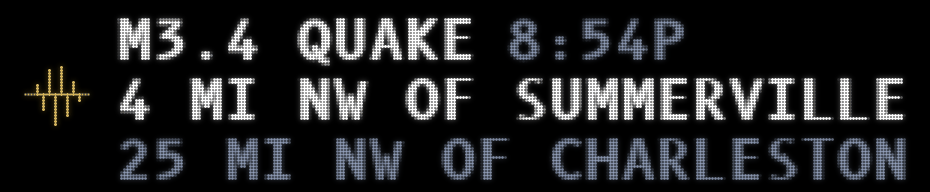
Now, the next hours and the days aheadA tornado warning, and what to doAn AMBER Alert near one of your placesA hurricane, and how close it comesAn earthquake near youA wildfire, and how much is contained
Up to four places, by ZIP code, airport or a pin you drop on a map - a school, a cabin, the office
Right now, hour by hour from 3 to 24 hours ahead, and day by day for up to a week, in °F or °C
Weather pictures that move, and the details you want beside them: the high and low, the wind, the humidity or the conditions in words
Watches and warnings from the National Weather Service, as much or as little as you like: warnings only, watches too, advisories as well, or everything
Public safety alerts from local authorities: evacuation and shelter-in-place orders, AMBER Alerts and more, with their own switch
Dangerous warnings that take over the whole screen while they last, or stay among the cards - with the radar and the warned area for a storm
Hurricanes and typhoons by ocean, earthquakes, wildfires and tsunami alerts, measured from your places
Flights
A plane overhead, and its routeA takeoff from the airport nearbyA plane declaring an emergency
The planes over your home, watched from your house or an airport, from 5 to 250 nautical miles out
Up to five particular planes, followed by flight number or registration wherever they fly
Military flights, if you'd like them
Each plane's altitude, speed, distance and direction, its route on a map when it's known, and its takeoff, landing or emergency
Space and the sky
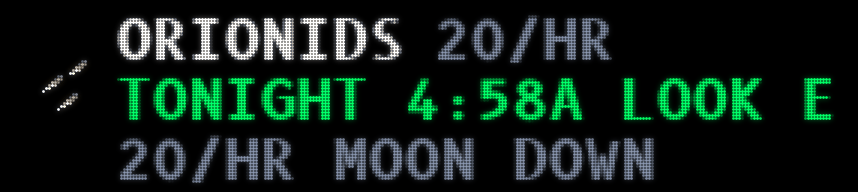
A launch countdown, and where to lookThe space station, and when it passes overA Starlink train, and when to see itA solar eclipse, and its pathA meteor shower's peak nightThe northern lights, when they may reach youTonight's moonAn asteroid passing, in moon distances
Rocket launches from around the world, from a day to two weeks ahead, with a countdown and where the booster lands
The International Space Station and China's Tiangong on a map of the world, and when each passes over you
Alerts when the station, a Starlink train, a launch you can see from home, an eclipse, a meteor shower or the northern lights is about to be visible
The moon, eclipses, meteor showers, the northern lights, spacewalks and splashdowns, passing asteroids and reentries, each its own switch
Rivals
A rivalry with friends or family, on the ticker of everybody in it: its name and emoji, who picked what, how it stands, the messages and the countdown to the loser's forfeit
What the loser does - the winner's jersey for a week, the kids' pick of a costume - never money, and the forfeit day the ticker counts down to
Settled by a playoff series, read as it's played, with a tiebreak on the runs scored - or by whoever you say won
A fan group: friends who each follow their own teams in one league, their games for the week, and a grudge match when two of their teams meet
A wall of shame: as many past seasons' losers on the card as you choose, and the all-time record
Nobody is in a rivalry until they accept, and anyone can follow along without a side
Your photos
Your own pictures scrolling past with everything else, from a Google Drive folder shared by link; add to the folder and they appear on their own
The newest 25, 50, 100, 150 or 200, each the full height of the panel in its own shape
On, off or on a schedule for each panel, like any other ticker
Only the folder's list of files ever reaches our servers; the panel fetches its own copies and deletes them when you remove the folder
In your browser, on your phone and on 64-row LED panels; a 32-row panel is too small for them
Your household, and modes
A household: up to five people you live with, each with an account of their own - their teams, watchlist, flights, weather places, rivalries and phone - on one subscription
The panel shows everybody's teams; anyone can take theirs off it, and everybody's own browser and phone stay their own
Anyone in the household can set what the panel shows; naming and removing panels stays with its owner
Modes: a whole setup saved under a name - an NFL game day, a Wake Up with the weather, your photos and the news - which tickers, how they look, brightness and speed, for every panel or just some
A mode turns on with one press from the home page, for an hour, two or four, or until you turn it off - or on a schedule, like 5 to 8 every morning
Turn one off and the panels go back exactly as they were; the one turned on most recently shows
The panel itself
Every team in its own colors, or the whole panel in amber like a stadium board
A TV-style score box, a single line, or large logos with a big score between them
Brightness and scroll speed
Hours for each kind of information, on the days you choose, in your time zone - or the panel's own
Panel groups, so each panel or group shows its own feeds, look, schedule, brightness and speed
Living room mode: the panel dark, or showing seasonal artwork or a picture of the weather outside, until you switch it back
Made to live on your wall
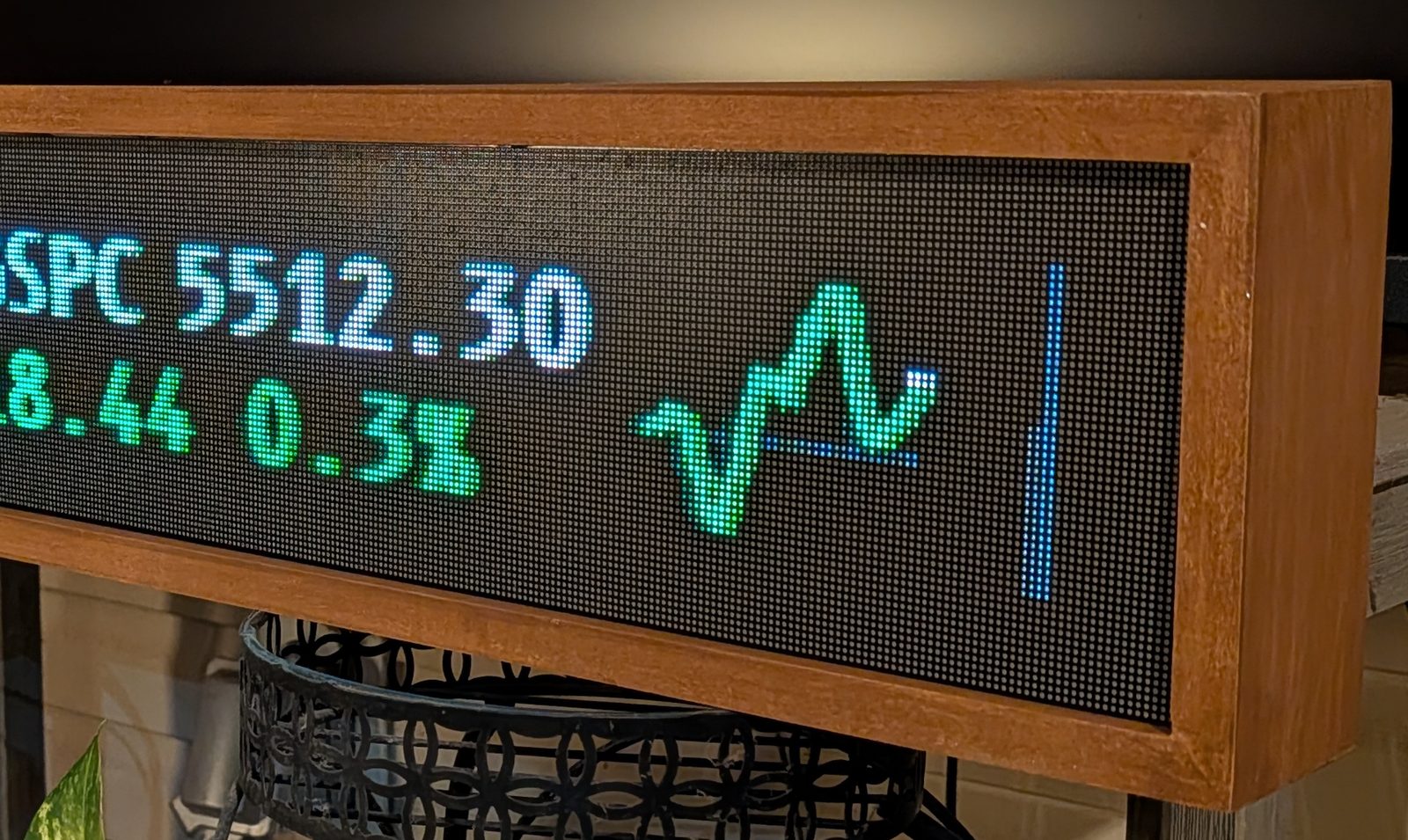
With 64 rows of full-color LEDs, more than 32,000 of them 2.5 mm apart, text, maps and
pictures look smooth and clear rather than blocky. You can dim it, or have it switch off on
a schedule that suits your home.
Up close: a stock and the shape of its day, in the panel's wooden frame
Easy to set up from your phone. There's nothing to install. You connect your
phone to the panel for a moment, choose your home Wi-Fi, and enter the code the panel shows
to link it to your account.
Takes care of itself. It installs updates automatically and starts back up on
its own after a power outage.
Built in small batches. Each panel is assembled and tested by hand before it
ships, and it comes with a one-year limited warranty.
The details
Size
52 × 8 × 4 in (132 × 20 × 10 cm)
Display
512 × 64 full-color LEDs (32,768 of them), 2.5 mm apart: 64 rows, so text, maps and pictures draw smooth rather than blocky
Inside
A Raspberry Pi 4, with software that updates itself
Connection
Dual-band Wi-Fi, 2.4 or 5 GHz, with a working internet connection
In the box
The panel, its power cable and a quick start guide
Service
A free trial of GridTicker comes with each panel, started by the code on the card in the box. When your free trial is up, a GridTicker subscription is $10 a month for your browser and all of your panels, and you can cancel any time.
Warranty
One-year limited warranty
Set up in about five minutes
All you need is a phone and your Wi-Fi password. If you'd like to see each step ahead of
time, our help page walks through every screen the panel shows
along the way.
Plug it in. After about a minute, the panel shows JOIN WIFI.
Connect from your phone. Choose the GRIDTICKER network in your phone's Wi-Fi
settings, then pick your home Wi-Fi and enter its password.
Link it to your account. Sign in, or create an account, and type in the code the
panel shows.
That's it. The panel starts scrolling right away and follows your settings from
then on.
What it costs
The panel: $999.99. You pay for it once,
and a free trial of GridTicker is included. Shipping and any sales tax are added at checkout,
before you pay.
Your free trial starts when you set it up. Inside the box is a card with a code.
Scan it to create your account or sign in, and add a payment card. Nothing is charged until
your free trial is up. Giving the panel as a gift? The trial goes to whoever uses the
code.
When your free trial is up, $10 a month covers GridTicker in your browser and on
every panel on your account. You can cancel any time, though the panel needs an active subscription to
keep showing your ticker.
30-day returns. If you send the panel back without setting it up, we refund what
you paid for it. If you've set it up, we refund it less a 15% restocking fee. You cover
return shipping unless the panel is faulty.
A one-year limited warranty covers the hardware, and we pay shipping both ways
for a warranty repair.
When you buy a panel, you
agree to our terms of sale, which explain returns, the warranty
and what the panel depends on in more detail.
Common questions
Do I need a subscription?
Yes, when the free trial that comes with your panel is up. The panel shows the
information the GridTicker service sends it, and one subscription covers your browser and every
panel on your account. The code that comes with your panel starts the subscription, and
nothing is charged until your free trial is up.
I already have a subscription. What does the code do?
Enter it on your account and your next payment moves later by the length of the trial.
Each panel comes with its own code, so two panels move it twice.
Does it work without the internet?
The panel needs a Wi-Fi network with a working internet connection to get its information.
Networks that ask you to sign in on a web page first, like many hotel and dorm networks,
won't work.
What happens if a league or a data source changes?
The scores, prices and forecasts come from other organizations, and any of them can change
what they offer or stop offering it. If that happens, a feature on the panel may change or go
away. Because the subscription is month to month, you're never paying in advance for
something that's no longer there.
Can I move it, or give it to someone else?
Of course. Remove it under Settings → LED panels and it forgets your Wi-Fi details,
ready for its next home or owner.
Will it be too bright at night?
It doesn't have to be. You can set the brightness, and give each kind of information its
own schedule, so the panel goes dark at bedtime on its own.
What if I need help?
Once you're signed in, tap the ? in the corner of any page to ask our AI assistant,
which can see your settings and point you to the right one. The guide
explains every setting with pictures, and you can always write to us at
support@gridticker.com.
Where do you ship?
We currently ship to addresses in the United States.
Hear when panels are available
Leave your email address and we'll let you know as soon as panels are available to buy.
We'll send you one email, when LED panels are available, and nothing else.
Once it's sent, your address is deleted. If you'd like to come off the list before then, just
write to support@gridticker.com.
 Sign inGet started