
ESPN Bottomline for the Playoffs: Series and Brackets
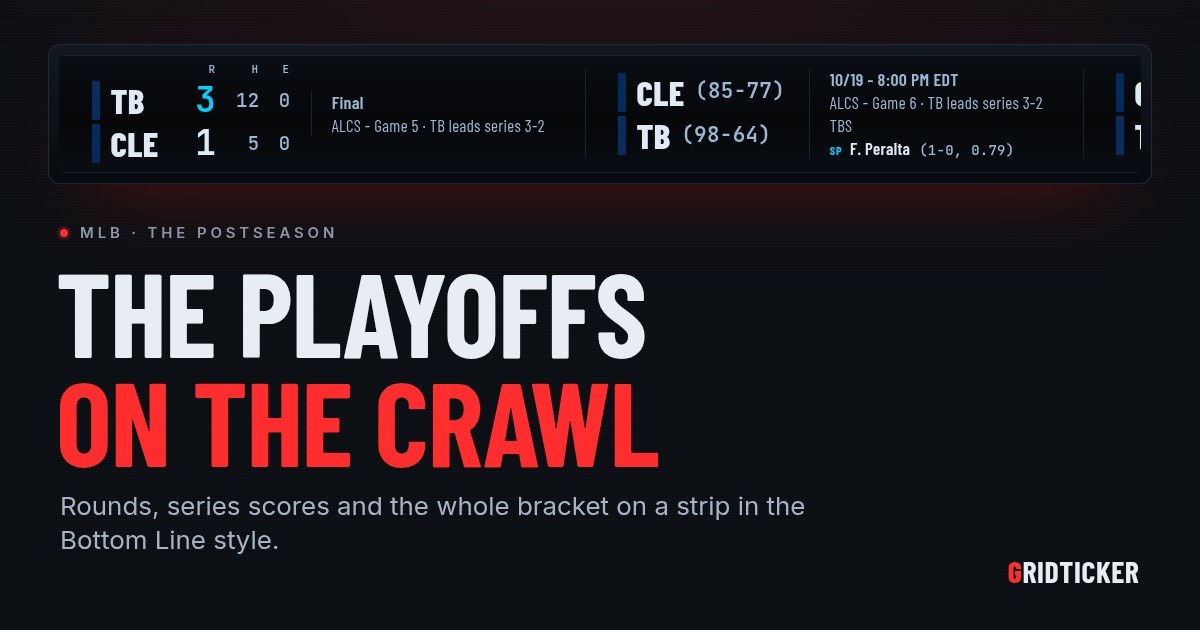
If you searched for the ESPN BottomLine, you probably want the scrolling crawl of scores along the bottom of the screen, on a screen of your own. GridTicker is a live ticker that runs in a browser, and one of its themes is called ESPN Bottom Line. This article is about the time of year when that kind of crawl matters most: the playoffs. Every game is about a round and a series, and the bracket keeps changing as the week goes on.
We have already covered how to read the crawl, the theme, layout and speed settings and running it on any device. This one covers the postseason.
What a bottomline crawl has to do in the playoffs
During the regular season, a line on the crawl only has to answer one question: who is winning? In the playoffs a score says less on its own. A 3-2 game means one thing in the first game of a series and something else when one team is a win from going home. A playoff crawl has to carry three things:
- The round. Which series this game is in.
- The series score. How the series stands before and after tonight.
- The path. Who the winner plays next, and where the rest of the field stands.
GridTicker puts all three on the same strip.
How a playoff game reads on the strip
The round and the series
In the playoffs, a game names its round under the clock, as in "ALDS - Game 3". It also says how the series stands, so you never have to work it out from memory. Football's wild card games and college bowls get their names in the same spot. The game that ends a series says who won it, and that line is the last you will see of that matchup.
Games still to come
A game that hasn't started shows its start time and the channel carrying it. In baseball it also shows each side's probable starting pitcher, with his record and ERA. Turn on Records and each team's win-loss record appears beside its name on games still to come. If you want tomorrow's games on the strip as well as tonight's, Upcoming reaches sets how far ahead the ticker looks, from today only up to the next two weeks.
Big moments
Some plays get a badge of their own. NO-HITTER BID shows up from the fifth inning when a team still has no hits, and names the pitcher. PERFECT GAME BID shows up when nobody has reached base at all. When a team scores, the play gets two minutes of its own, with the scorer's name. If a celebration on the wall isn't what you want during a tense game, Score celebrations turns them off for each screen.
The bracket, on the same strip
A broadcast crawl lists games one at a time. GridTicker also draws the whole postseason as a bracket, so you can follow it from the first round to the title.
Baseball's double-sided bracket
Baseball's bracket has two sides. The American League runs from the left and the National League from the right, with each round labeled by league and name: AL WC, AL DS and AL CS on one side, NL CS, NL DS and NL WC on the other. The World Series (WS) sits in the middle, under a box that holds the champion once there is one.
Each series is one line, with each team's color bar and its wins in the series. Reading the colors:
- White names: the series is still being played.
- Green and red names: the series is over. The winner is green, the loser red.
- A red score: a game in the series is being played right now.
- Dimmed: a team that has been knocked out.
- ---: a spot still being played for.
When the first postseason game starts, the bracket replaces the standings tables. Once there is a champion, the tables come back with the final bracket beside them, and they stay through the offseason until the new season's standings begin.
Football and the other leagues
The NFL, NBA, NHL and WNBA get brackets too. Football plays every round as a single game, so each line shows that game's score instead of series wins. The NHL pairs teams by division, and the WNBA's bracket covers the whole league, with its Finals in the last column. Every league's championship has the same box for the champion above it.
Setting up a playoff crawl
Here is the order to do it in:
- Pick the look. Under Settings, General, in the Browser block, set Theme to ESPN Bottom Line.
- Pick the layout. Single line puts the whole game on one line, like the original broadcast crawl. TV score box is the other choice.
- Turn on the bracket. It comes with a league's standings, and no standings are on until you choose some. Tick the league under Standings, and make sure that league is also on under Feeds, or its table won't appear.
- Put your teams first. Star them under Favorites, then turn on Favorites first so they come ahead of the rest of their league.
- Set the hours. Under When each ticker appears, give each ticker hours on each screen, for example scores in the evening and stocks while the market is open.
Where to put it
A playoff crawl is something you glance at, not something you sit and watch. It runs in any modern browser on Windows, macOS, Linux or a Raspberry Pi, with nothing to install, so a spare laptop, a second monitor or a TV in the corner will do. Fit text to the screen sizes the text to the window's height, so a thin strip across the top of a monitor and a whole television both get text that fits.
If you follow more than sports, Stack tickers in rows gives each ticker its own row, so the bracket doesn't wait behind headlines and stock prices. On a desk, Pause on hover stops the strip while your mouse is over it, so you can read a series score without chasing it. Your settings follow your account, so the strip looks the same on every machine you sign in on.
How GridTicker helps with this
GridTicker gives you a crawl in the Bottom Line style with the playoff details already on it: the round and series score on every game, the probable starters and channel for the next one, and a bracket that colors each series as it ends. The guide's bracket section explains how each league's bracket is drawn and when it shows up.
To have the rest of this postseason scrolling on a spare screen, set up a strip at https://app.gridticker.com/signup.