
Where Is the ISS Right Now? Track It on a Live Ticker
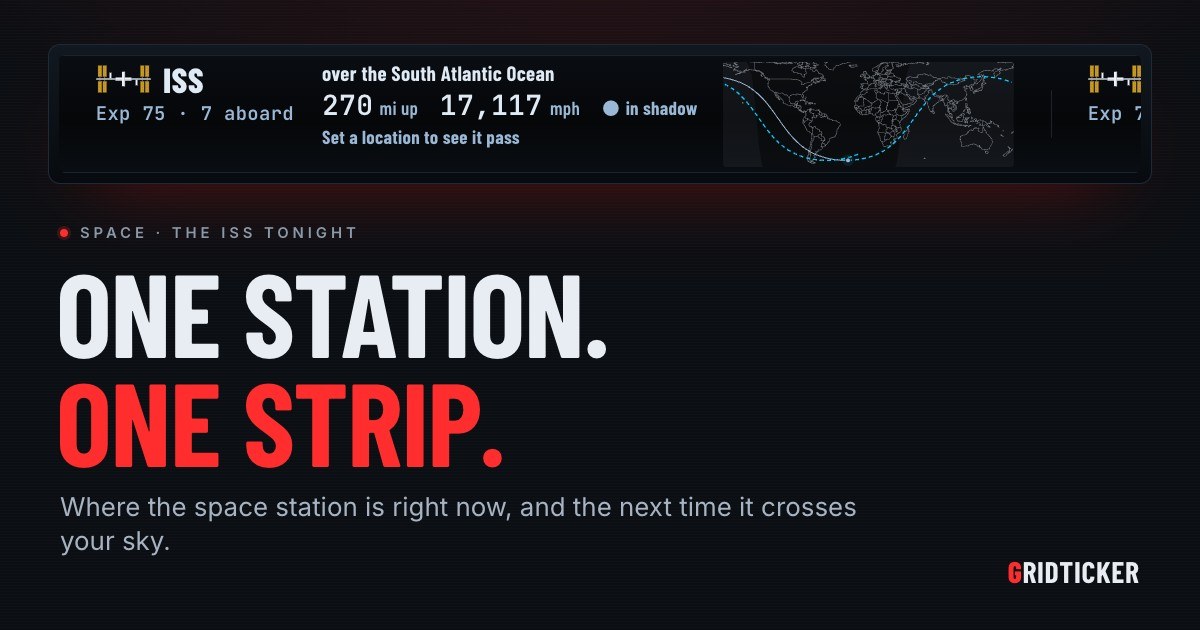
The International Space Station circles the Earth about every hour and a half, so the answer to "where is the ISS right now?" changes from one second to the next. A fixed answer goes out of date almost at once. What you need is a live map that keeps up with the station. GridTicker's Space ticker has an ISS card that says what the station is over right now, how high it is, how fast it is going, whether it is in sunlight and who is aboard. It also gives the next time you can see the station from where you live.
Why "right now" is the hard part
Most people who search for the ISS are asking one of two things:
- Where is it on the map? Which country or ocean it is crossing, and where it is headed.
- Can I see it tonight? When it will cross your sky, and where to look.
A search result can only answer the first one for the moment you looked. The second depends on where you live, the time of day and how high the pass is. A ticker on a spare screen answers both and keeps answering, so you can look up from your desk whenever you want and get the current answer.
Reading the ISS card
The ISS card is one item on the Space row, and it shows:
- What the station is over right now, as a place on the globe.
- How high and how fast it is going.
- Whether it is in sunlight. This matters, because you can only see the station from the ground when sunlight hits it.
- Who is aboard.
The map
The card's map shows the whole world with the night side shaded. You can see where the station has been in the last 45 minutes, and a dashed line shows where it is going next. The station moves along that line by itself, second by second, so you don't need to refresh anything. Your own place is the ringed dot, so you can watch the station's path come toward you or pass by.
The bottom line
The bottom of the card gives the next time you can see the station from your place. This line tells you whether tonight is worth stepping outside.
When can you see the ISS from home?
You can see the ISS when it is in sunlight and your sky is dark. That is usually an hour or two after sunset or before sunrise, and those passes come in runs a week or two apart. So you might get several chances in a row, then none for a while. That is why a single search rarely gives you a useful answer.
Which passes count
Not every pass is worth watching. A pass that stays low can get lost behind trees and rooftops. On the Space page, Passes that climb at least lets you choose which passes count, for both the card and the alert:
| Setting | What it keeps |
|---|---|
| 10 degrees | Every pass above 10 degrees |
| 20 degrees | Passes that clear the trees |
| 30 degrees | Passes that climb a third of the way up |
| 40 degrees | High passes only |
The pass alert
When a pass is coming, the ticker tells you. Five minutes before the station comes into view, the screen shows a countdown and which way to face. While the station is up, it draws your sky as a circle, with the horizon as the edge and straight up in the middle, and shows where the station is in it. It also tells you how high to look, both in degrees and in fists held at arm's length, so you don't need to know any astronomy to find it.
You can turn this alert off by itself. It only shows on screens where the ISS card is on, and never on a screen that a schedule has turned off.
Tiangong, the other crewed station
China's Tiangong station is also in orbit, and the Space ticker follows it the same way. Like the ISS, you can see it when it is in sunlight and your sky is dark. It has its own feed under Space feeds and its own pass alert, which also starts five minutes before it comes into view. You can switch each station on for different screens.
What else the Space ticker follows
The space stations are one part of the Space ticker. Each item below is its own feed, worked out for your place:
- Launches. Every orbital launch in the world is listed, from Launch Library, looking ahead a day, three days, a week or two weeks. Each card shows the rocket itself, who flies it, the pad and the mission, with a countdown when the launch time is known to the minute. HOLD means the countdown has stopped. After launch the card says SUCCESS or FAILURE for twelve hours, and it shows where the booster is meant to land and then whether it did.
- Starlink trains. For about the first week after a launch, a batch of Starlink satellites flies low and close together and crosses the sky as a line of lights. This card appears only while a batch is still in that line. It says when you can next see it, where to look and how long the line takes to pass.
- The moon. Tonight's phase, when the moon rises and sets, and the next full moon by its name.
- Eclipses. An eclipse of the moon in the next month, and an eclipse of the Sun that can be seen from your place. The solar eclipse card always says to look only through eclipse glasses.
- Meteor showers. In the week around a shower's peak: when to watch, where to look, how many meteors an hour, and whether the moon will wash them out.
- Northern lights. NOAA's three-day forecast, compared with the strength needed to reach your place.
- Spacewalks, dockings and splashdowns. When the next one is, with a countdown when its time is known to the minute.
- Asteroids passing. The closest one in the next two weeks, how big and how fast it is, and how far away in moon distances. None of them is a danger to Earth.
- Reentries. Rocket stages and satellites low enough to come down in the next day or two.
Some of these also have alerts that take over the screen from a few minutes before the event until it is over, showing which way to look and how high. These include a launch you can see from home, a Starlink train, a solar or lunar eclipse you can see from home, a meteor shower at its peak, and northern lights that may reach home.
Setting where you watch from
All the pass times depend on where you are. On the Space page, under Where you watch the sky from, type an airport code or use your browser's location. If you leave it blank, GridTicker uses your Flights location, and if that is blank too, your first weather place.
How GridTicker helps you follow the ISS
GridTicker runs in any modern browser on Windows, macOS, Linux or a Raspberry Pi, with nothing to install. Put it on a second monitor, a TV in the corner or a spare laptop and leave it running. The ISS card keeps the station moving across its map, and the pass alert lets you know when it is time to go outside.
To set it up, open Settings → Space. Choose your place, choose which passes count, and switch on the ISS feed and any other Space feeds for the screens you want them on. With Stack tickers in rows on, the Space feeds get a row of their own beside your scores, stocks and headlines. You can also give each ticker hours on each screen. The GridTicker guide explains every card on the Space row.
To see where the ISS is right now and when it next crosses your sky, set up a strip at app.gridticker.com/signup. Every new account starts with a trial.